
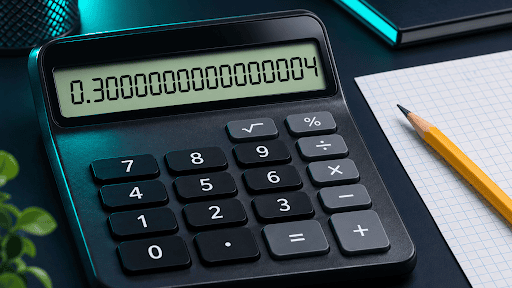
In ordinary decimal arithmetic, 0.1 + 0.2 equals exactly 0.3. Some calculators and programming languages display 0.30000000000000004 because they store numbers using binary floating-point arithmetic. In that format, 0.1 and 0.2 are stored as nearby approximations. Adding those approximations and rounding the result to a representable value can produce the long decimal you see on screen. JavaScript’s standard Number type is one familiar example.
The extra digits are tiny in this example. Understanding where they come from helps you decide when a simple display adjustment is enough and when your calculation needs a different way of handling numbers.
Why 0.1 Repeats in Binary
In base 10, the digits after a decimal point represent tenths, hundredths, thousandths, and so on. The number 0.1 fits neatly because it is exactly one tenth. Binary uses powers of two instead. The places after the binary point represent halves, quarters, eighths, sixteenths, and smaller fractions.
A number such as 0.125 fits neatly in both systems. It equals (1/8), so it takes just three places after the binary point to write it as 0.001 in base two. One tenth behaves differently. Its binary expansion starts 0.0001100110011… and keeps repeating. A calculator using a fixed number of binary digits has to store a nearby value.
You can see the same principle in decimal arithmetic by dividing one by three. The result 0.3333… repeats indefinitely. If you write 0.3333 on paper and multiply it by three, you get 0.9999. The exact calculation (1/3 \times 3) gives 1. The small difference comes from working with the shortened decimal.
Why Some Calculators Show 0.3 Anyway
A calculator’s display can show fewer digits than the value used internally. A tool might format a result as 0.3 for readability even if the underlying arithmetic uses an approximation. Another tool might use decimal arithmetic and represent the inputs 0.1 and 0.2 exactly in the first place. Both approaches can produce the same visible answer.
To see how a browser tool presents the result, enter 0.1 + 0.2 in this free calculator and read the output. CalcSolver documents that its display rounds results to 12-digit precision. The number you see tells you how the result is presented. Determining the internal number format takes more information than a single display test.
There is also a difference between 0.3 and 0.30 as formats. They have the same numerical value. Writing 0.30 tells the reader the result is being reported to two decimal places, which can matter when a worksheet or report asks for a specific level of precision.
Three Places Where Rounding Can Happen
- When you enter a number. If the number has no finite binary representation, the calculator stores a nearby value.
- When the calculator performs an operation. The result of adding, multiplying, or dividing stored values may land between two representable numbers. The calculator rounds it according to its arithmetic rules.
- When the answer appears on screen. The calculator may format the result to a certain number of digits. That formatting can happen independently of the stored value.
This distinction explains why seeing 0.3 on the screen and testing whether a computed value equals 0.3 in a program can give different impressions. JavaScript, for instance, displays 0.30000000000000004 for the sum and treats it as different from the stored value of the literal 0.3 in a strict equality comparison.
How to Round a Calculator Result Correctly
Use the precision requested by the problem. If a question asks for two decimal places, 0.30000000000000004 becomes 0.30. If it asks for three significant figures, the same result becomes 0.300. Decimal places count positions after the decimal point. Significant figures start at the first nonzero digit.
If you’re checking an answer by hand, practice rounding numbers correctly with a value close to a boundary. For example, 2.7449 rounds directly to 2.74 at two decimal places. If you first round it to 2.745 and then apply the usual classroom rule of rounding an exact halfway value up, you get 2.75. Rounding twice changed the reported answer.
Keep the intermediate values at their available precision and round at the end, unless the task specifies a rounding rule for individual steps. For a simpler example, calculate ((10 ÷ 3) × 3). If you write down 3.33 after the division and use that shortened number for the next step, you get 9.99. Keeping more precision through the multiplication gives a result at or much closer to the exact answer of 10.
When a Tiny Difference Matters
For a homework answer reported to one or two decimal places, the extra digits in 0.30000000000000004 disappear at the requested precision. In software, a strict equality check can still react to them. For approximate measurements, programmers often check whether two numbers are close enough within a tolerance that fits the scale and purpose of the calculation.
Exact decimal calculations call for a different approach. For example, adding 10 cents and 20 cents can be expressed as integer arithmetic in cents, giving 30 cents. Software can also use decimal arithmetic configured for the task’s required precision and rounding rules. Decimal arithmetic can represent tenths exactly, though a result such as one divided by three still needs rounding when stored to finite precision.
Frequently Asked Questions
Is 0.30000000000000004 the exact answer to 0.1 + 0.2?
The exact decimal answer is 0.3. The longer value is the displayed result in some binary floating-point systems.
Can binary floating point store any decimal fractions exactly?
Yes. Fractions such as 0.5, 0.25, and 0.125 work because they are halves, quarters, and eighths.
Should I write 0.3 or 0.30 on my homework?
Use 0.30 when the question asks for two decimal places. For an exact decimal answer without a formatting requirement, 0.3 expresses the same value.
Does adding more display digits make an answer more accurate?
Extra digits reveal more of the stored result. They can also reveal the approximation, as the final 4 does in this example. The arithmetic and number format determine the underlying precision.
